Traffic Sign Recognition
The Traffic Sign Recognition system uses the front cameras and navigation system data to recognize traffic signs on the road, providing you with driving information such as speed limits and other regulations.
When a traffic sign is detected, it displays on the Cockpit Panel next to the speedometer.
Speed Limit Alerts
When Speed Limit Alert is enabled (see Speed Limit Alert settings), if the current vehicle speed exceeds the detected speed limit, the display color of the speed limit sign will change color and may increase in size. The display will return to the normal color and size when the vehicle is slowed to within the speed limit.
Wrong-way warnings
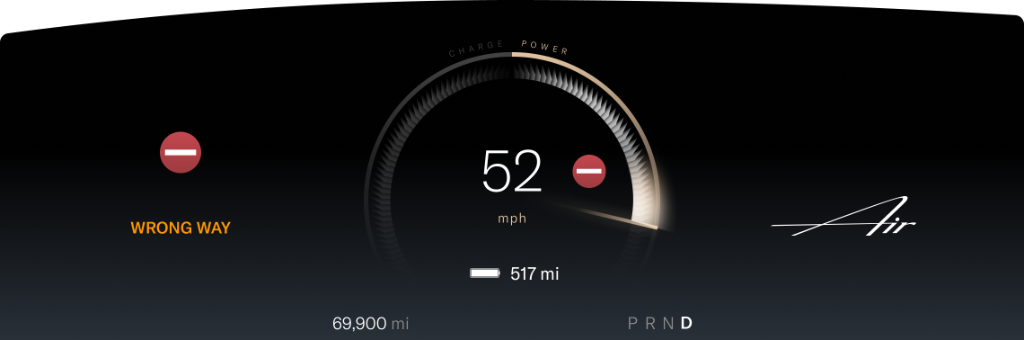
If a Wrong Way road sign is detected and the vehicle passes the sign, the system will alert you with an audible alert and a notification on the Cockpit Panel.
Speed Limit Alert settings
To configure Speed Limit Alert settings, use the Pilot Panel and touch  >
>  DreamDrive.
- Touch to enable or disable Speed Limit Alert. Additional options to receive VISUAL or VISUAL AND AUDIO alerts are available when this feature is enabled.
- Touch to enable or disable Cruise Speed Update. When enabled, this feature notifies you when a new speed limit is detected and prompts you with an option to update your cruising speed when Adaptive Cruise Control is active. It is the driver's responsibility to determine the appropriate speed limit, road conditions, and driving speed. See Adopting new speed limits.Note: When this feature is disabled, the detected speed limit will still be displayed next to the set cruise speed on the Cockpit Panel.